Table of Contents
- TikTok sampling challenge
- How much does sample-ghosting actually cost TikTok Shop sellers?
- How do TikTok Shop’s Refundable Samples work, and do they really stop ghosting?
- Where do I turn on Refundable Samples in the Affiliate Center?
- If I keep free samples on, how do I get more creators to actually post?
- What should the 3-day post-sample reminder include?
- What should the 7-day reminder say to re-engage a creator?
- How can ShopliveX help you stop wasting samples and increase your video output?
TikTok sampling challenge
If you have ever watched 50 free samples ship out and only 3 videos go live, you already know how brutal TikTok Shop affiliate sampling can be. Sample waste is one of the biggest costs you can actually control in early TikTok Shop growth, and most sellers spend on it without a clear system to push the video post rate up.
How much does sample-ghosting actually cost TikTok Shop sellers?
Across the industry, fewer than 1 in 5 samples turns into a posted video if you do not filter creators, with a video post rate under 20%. A typical sample bundle costs $15–$50 once you add product, shipping, packaging, and handling. At a 20% post rate, every video that goes live costs you 5 samples. Multiply by even a moderate 150-sample-per-month outreach pace and you are looking at $2,500–$7,500 a month in sample spend just to keep 20–30 videos going live.
For new shops still building reviews and creator momentum, this is often a big chunk of the monthly budget. Cutting your ghost rate from 80% down to 40% can roughly triple your content output for the same dollar.
How do TikTok Shop’s Refundable Samples work, and do they really stop ghosting?
TikTok Shop recently added a “buy sample and refund” feature inside the Affiliate Center. Instead of shipping a free product, you charge the creator the sample cost up front. When the creator posts content and meets the seller-set criteria (we recommend setting it to one converted order), TikTok automatically refunds them.
This is one of the most effective changes you can make to your sample program, and we recommend turning it on whenever a brand can support it. The idea is simple: creators with no intent to post will not pay, so they drop out before you ever ship. Creators with real intent know they will get their money back as soon as they hit your post target, so they are motivated to ship the video fast.
Official documentation: TikTok Shop Refundable Samples knowledge article
Where do I turn on Refundable Samples in the Affiliate Center?
In Seller Center, click on Open Collaboration under your collaborations and select the product you want. In this section you will see two options:
- Refundable samples: enables the pay-then-refund mechanic.
- Creator refund criteria: sets the trigger that returns the sample cost to the creator.
We recommend setting the criteria to “1 order generated.” A creator who shoots a video and drives even a single attributed sale gets their sample for free; freeloaders never make it past the payment step.
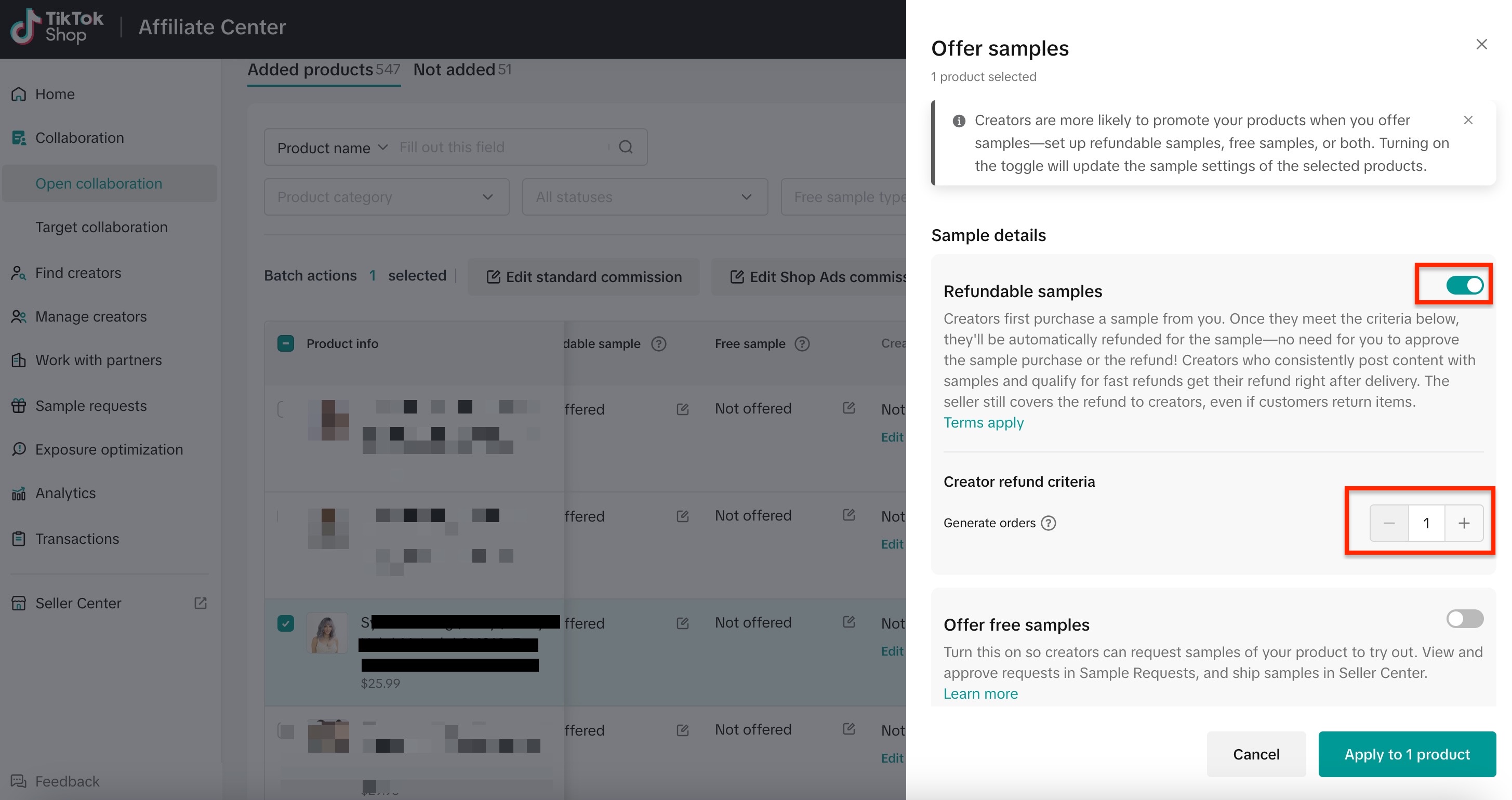
This setup is one of the highest-impact things a TikTok Shop seller can do for their sample program, especially for brands in the growth stage that already have some traction on TikTok. It takes about 5 minutes per product to enable, and the lift in post rate usually shows up within the first week.
If I keep free samples on, how do I get more creators to actually post?
Refundable samples is not the right fit for every brand. Some sellers turn it on and watch sample requests drop to the point where they no longer have enough creators making videos. If you are in that spot, you keep Free samples on, and the same ghosting problem applies whether the creator finds you through Open Collaboration, your DMs, or your email outreach.
For our brands on free sampling, we run a two-touch reminder system. Both reminders are built to help the creator post, not just to ask if they will. This system has consistently lifted video post rates on the free-sample programs we run, often by a large margin.
What should the 3-day post-sample reminder include?
Three days after the sample is delivered, send a reminder that bundles three things:
- A short video shoot script: outline the product’s two best selling points, the core hook, and a recommended call-to-action. Keep it under 100 words.
- 1–2 reference videos from other creators that have converted well for the same product.
- A friendly note about the post-deadline: the tone is a nudge, not a threat.
The reason this works: the number-one reason creators delay is not laziness, it is friction. They do not know what to say or how to film it. A script plus reference videos can cut 30 minutes of creator pre-production down to about 5 minutes. Creators consistently tell us this is the most useful thing a brand has sent them, and it works especially well right after they unbox the product.
What should the 7-day reminder say to re-engage a creator?
At day seven, switch the angle. Instead of “please post,” show that the product is winning. We send creators an update with:
- Sales velocity since they received the sample (e.g., “We have added 240 orders in the last 5 days”)
- One trending video example from another creator, if one is performing well
- A short note that the trend window is closing
TikTok creators live and die by trends. They catch trending topics, trending music, and trending products early. By showing momentum, you flip the creator’s question from “should I post this?” to “am I missing the trend?” That is a very different ask from a polite reminder, and we see strong lifts on this second touch across the brands we work with.
How can ShopliveX help you stop wasting samples and increase your video output?
ShopliveX has helped many clients run the full TikTok Shop affiliate funnel, including affiliate filtering and selection, sample logistics, scripting, reminder cadence, and performance tracking. Across our client portfolio we have created over 20,000 video posts. It is an integrated content production pipeline that can turn a good product into a content engine that actually works on TikTok. Our video production pipeline strategy is here: https://www.shoplivex.com/tiktok-video-strategy
If your sample budget is climbing faster than your video output, that gap is what we close. Talk to us about your current ghost rate and what we would change first.